About Wi-Fi Info
Everything you want to know about your WI-FI CONNECTION but were afraid to ask. Wi-Fi Info is a small and useful utility that lets you see detailed information about current Wi-Fi connection from hotspot informations to...
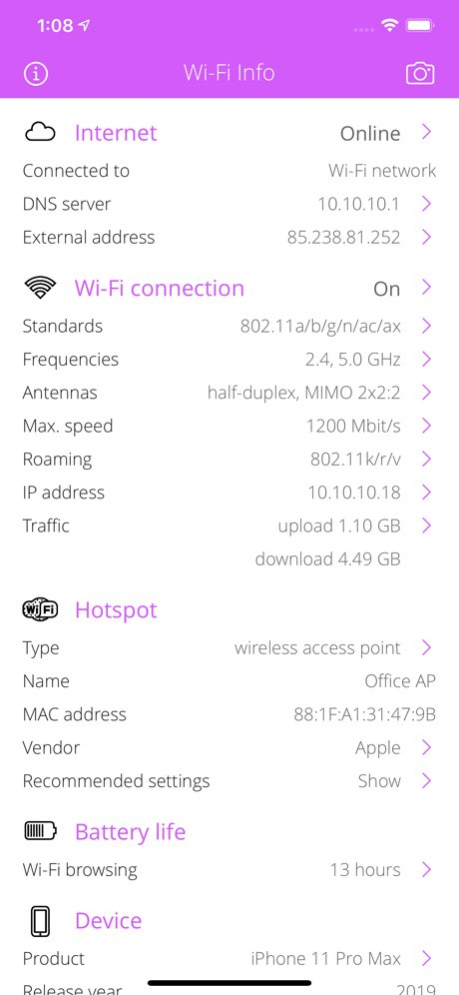
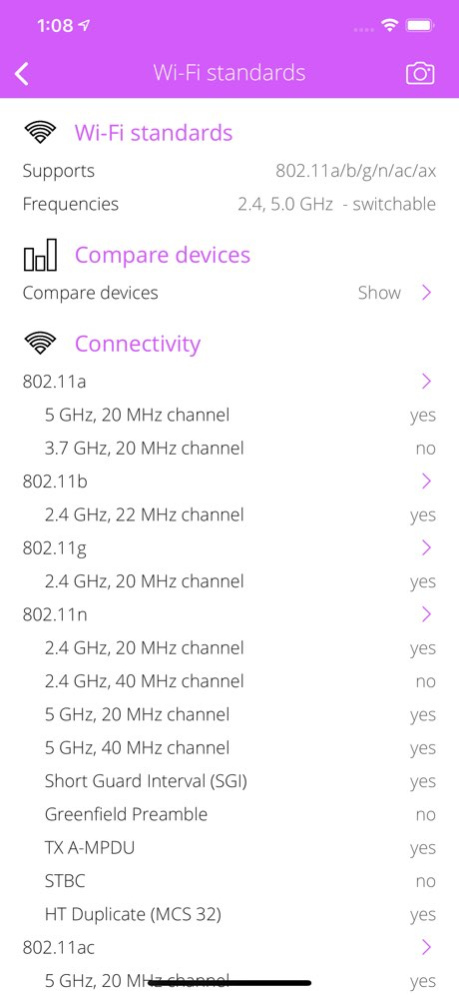
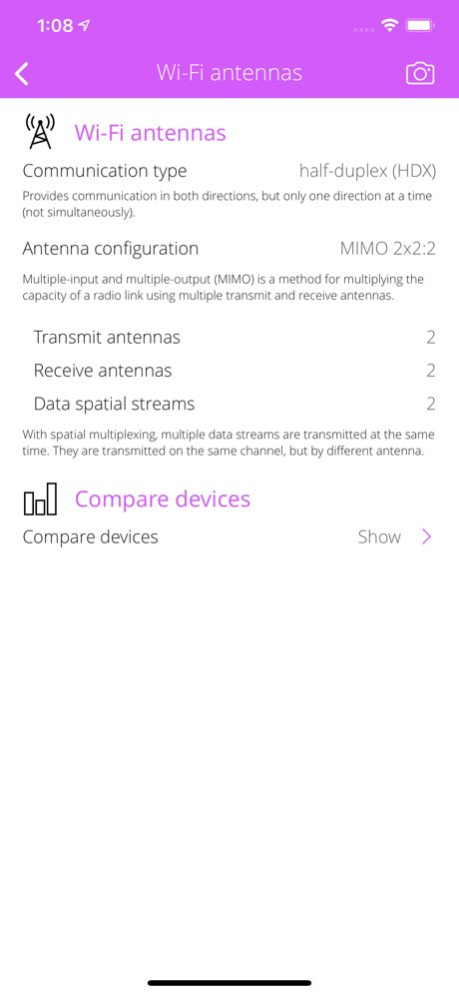
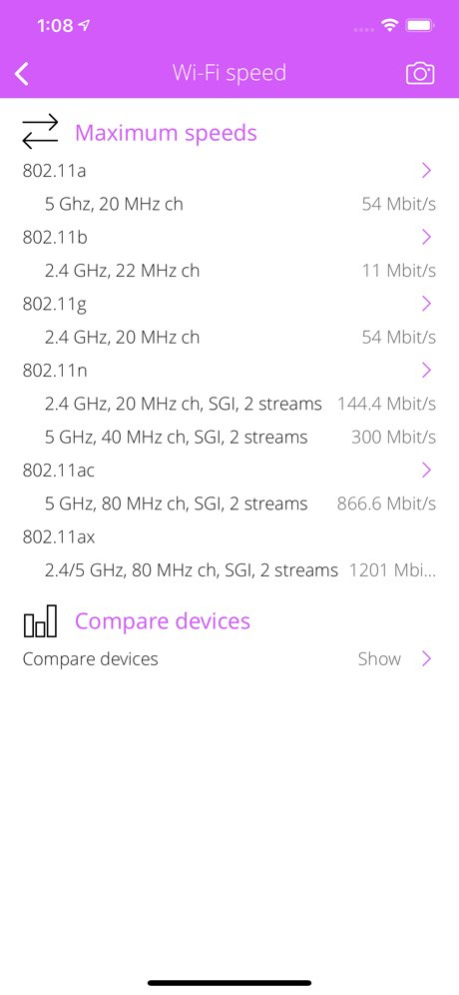
Everything you want to know about your WI-FI CONNECTION but were afraid to ask. Wi-Fi Info is a small and useful utility that lets you see detailed information about current Wi-Fi connection from hotspot informations to wireless features and more. WI-FI ACCESS POINT / HOTSPOT INFO . Detect hotspot type (wireless access point or ad-hoc connected device). . Hotspot SSID (service set identification), MAC address, IP address and vendor informations. WI-FI CONNECTION INFO . Detect and explain wireless standards supported by your device (802.11a/b/g/n/ac/ad). . Detect wireless speed-up features (short guard interval, STBC, HT duplicate, etc). . Detect and explain wireless operation frequencies and channels. . Detect and explain available antennas, MIMO config, spatial streams. . Detect and explain Wi-Fi roaming (802.11k/r/v) support. . Detect wireless security options and modes (WPA standards and EAP modes). . Detect wireless optimization (WMM) and access features (Wi-Fi Direct, Miracast, Voice). . Detect max. physical wireless speeds. . Show Wi-Fi network traffic counters: upload, download, errors, quality of service (QoS) categories. COMPARE DEVICES . Compare iPhone, iPad, iPod Touch and Apple TV devices. . Compare supported Wi-Fi standards and frequencies . Compare built-in antennas (MIMO config). . Compare maximum speeds. WI-FI HARDWARE INFO . Detect built-in Wi-Fi chip type. INTERNET INFO . Show default gateways, IP addresses, networks. . Show DNS servers, search domain names, local MAC addresses, host name resolve. . Depth external address analysis: ISP name, autonomous system name, whois, ping, regional internet registry info. . Full offline MAC vendor database. DEVICE INFO . Detect device type and model. . Detect processor type. . Detect memory size. . Detect storage size. . Detect firmware name, version. . Detect last reboot time. REACH UI FEATURES . Info menu with feedback and privacy settings . Use the camera icon (upper-right corner) to create and print/send/share a screenshot from the entire page. . Pull down with your finger to refresh the informations. . Long press on a cell to copy/print/send/open as/share the cell value. . Shake your device to refresh the informations.
Version History BUG FIXES AND STABILITY IMPROVEMENTS 1.23 01/07/2025 IMPROVEMENTS • Better UI handling 1.22 10/07/2021 DEVICE SUPPORT • iPhone 13 (2021) family. 1.21 09/30/2021 DEVICE SUPPORT • iPhone SE (2020) support. 1.20 05/25/2020 DEVICE SUPPORT • iPhone 8 and 8 Plus support. 1.19 10/27/2017 DEVICE SUPPORT • iPad 5th. gen (2017) support. DEVICE INFO • Show device's release year. USER INTERFACE IMPROVEMENTS • Setting for turning off automatic device sleep. 1.18 06/01/2017 USER INTERFACE IMPROVEMENTS • Better Wi-Fi Hotspot detection. 1.17 03/24/2017 USER INTERFACE IMPROVEMENTS • Turn on/off suggested apps. MAC DATABASE UPDATE • 22947 large address blocks. 1.16 02/07/2017 USER INTERFACE IMPROVEMENTS • Dynamic font: using user's preferred font size. • System font: using system font instead of custom font. • Show current preferred font size. ENHANCED INFO MENU • Guided help for send e-mail. • Useful utility and science apps suggestions. 1.15 11/28/2016 HOTSPOT INFORMATION • Show recommended home or corporate Wi-Fi access point/router settings. DETECT BUILT-IN WI-FI CHIP • Compare iPhone, iPad and iPod devices. DETAILED WI-FI TECHNOLOGIES • Explain wireless access points (WAP) and wireless ad hoc networks (WANET). • Explain wireless interference sources and side effects. 1.14 10/27/2016 3D TOUCH SUPPORT • Home Screen Quick Actions. • Easy access to supported Wi-Fi standards, frequencies, antenna configurations and the current IP address of the Wi-Fi interface. NETWORK SEARCH SETTINGS • Turn on/off PING and WHOIS query of network nodes. OPTIONAL NETWORK DISCOVER FEATURES • Explain cellular, VPN and hotspot network properties of a default gateway. • Find DLNA and Bonjour services of a default gateway, DNS server or Wi-Fi access point. • Find printers, TVs, speakers, media libraries and remote controllers on the local Wi-Fi network. • Search for MAC vendors or MAC addresses. 1.13 10/08/2016 DEVICE SUPPORT • iPhone 7 and 7 Plus support. EXPLAIN AND COMPARE WI-FI STANDARDS • Release date. • Supported frequencies. • Channel bandwidth. • Maximum spatial streams. • Maximum data rates. • Indoor and outdoor ranges. • Modulation. • Subcarriers. EXPLAIN WI-FI FREQUENCIES • 2.4 and 5 GHz channels. • Channel width. • Overlapping channels. • Country availability. EXPLAIN ANTENNA CONFIGURATIONS • Describe MIMO and SISO configurations. • Describe spatial streams. EXPLAIN WI-FI DATA RATES • Support 802.11a/b/g/n/ac standards. • Describe guard interval, modulation schemes (DSSS, OFDM) and types (BPSK, QPSK, QAM). • List standard raw data rates (Mbit/s) and Modulation and Coding Scheme (MCS) indices. • Compare different data rates for various channel widths (20 / 40 / 80 MHz) EXPLAIN WI-FI ROAMING CAPABILITIES • Describe 802.11/k/r/v standards. • Describe Pairwise Master Key ID caching support. DETECT WI-FI CHIP • Detect on-board Wi-Fi chip and chipset. DETECT BATTERY LIFE • Detect and compare Wi-Fi browsing time. PLATFORM SUPPORT • iOS 10.x support. • Drop iOS 6.x support. • Drop iOS 7.x support. 1.12 09/23/2016 MAC DATABASE UPDATE • 22290 large address blocks. 1.11 08/16/2016 COMPARE DEVICES • Supported Wi-Fi standards. • Antenna configuration. • Maximum wireless speed. ENGINE IMPROVEMENTS • Better iPad optimization. 1.10 04/30/2016 DEVICE SUPPORT • iPhone SE. • iPad Pro (12.9" and 9.7"). ENGINE IMPROVEMENTS • Stabilization and performance. 1.9 04/25/2016 ENHANCED WI-FI INFO • Detect Wi-Fi roaming (802.11k/r/v) support. • Detect built-in Wi-Fi chip type. COMPARE DEVICES • Compare iPhone, iPad, iPod Touch and Apple TV devices. • Compare supported Wi-Fi standards and frequencies • Compare built-in antennas (MIMO config). • Compare maximum speeds. DEVICE INFO • Detect device type and model. • Detect processor type. • Detect memory size. • Detect storage size. • Detect firmware name, version. • Detect last reboot time. DEVICE SUPPORT • iPad Mini 4 support. • iPad Pro support. • iPod Touch 6G support. 1.8 12/05/2015 ENGINE IMPROVEMENTS • iOS 9 support. • iPhone 6s support. • iPhone 6s Plus support. 1.7 09/28/2015 USER INTERFACE IMPROVEMENTS • Better iPhone 6 user experience. • Better iPhone 6 Plus user experience. 1.6 09/02/2015 USER INTERFACE IMPROVEMENTS • Video guides in Info menu. 1.5 07/17/2015 APPLICATION SPEED UP • Faster network analysis. USER INTERFACE IMPROVEMENTS • Info menu extensions. 1.4 06/05/2015 APPLICATION SPEED UP • Faster application launch. • Smaller binary size. 1.3 05/06/2015 NEW NAME • Application renamed to Wi-Fi Info. ENGINE IMPROVEMENTS • Stabilization and performance. 1.2 04/11/2015 WI-FI INFORMATIONS • Show radio interference informations. REACH UI FEATURES • Use the camera icon (upper-right corner) to create and print/send/share a screenshot from the entire page. • Pull down with your finger to refresh the informations. • Long press on a cell to copy/print/send/open as/share the cell value. • Shake your device to refresh the informations. USER INTERFACE IMPROVEMENTS • Info menu with feedback and privacy settings (iOS 8+) • Some new and recolored images. • New margins. • Better iPhone 6 Plus icons. • More beautiful iOS 6 look and feel. • Label changes. • UI tweaks. ENGINE IMPROVEMENTS • Better VPN connection handling. • Faster databases. • Custom URL scheme: wifispy. 1.1 03/24/2015 1.0 01/05/2015
Previous Versions
Here you can find the changelog of Wi-Fi Info since it was posted on our website on 2016-10-30 08:49:24.
The latest version is 1.23 and it was updated on 2026-10-12 18:33:17. See below the changes in each version.
Wi-Fi Info version 1.23
Updated At: 2026-10-08
Changes: Version History BUG FIXES AND STABILITY IMPROVEMENTS 1.23 01/07/2025 IMPROVEMENTS
• Better UI handling 1.22 10/07/2021 DEVICE SUPPORT
• iPhone 13 (2021) family. 1.21 09/30/2021 DEVICE SUPPORT
• iPhone SE (2020) support. 1.20 05/25/2020 DEVICE SUPPORT
• iPhone 8 and 8 Plus support. 1.19 10/27/2017 DEVICE SUPPORT
• iPad 5th. gen (2017) support.
DEVICE INFO
• Show device's release year.
USER INTERFACE IMPROVEMENTS
• Setting for turning off automatic device sleep. 1.18 06/01/2017 USER INTERFACE IMPROVEMENTS
• Better Wi-Fi Hotspot detection. 1.17 03/24/2017 USER INTERFACE IMPROVEMENTS
• Turn on/off suggested apps.
MAC DATABASE UPDATE
• 22947 large address blocks. 1.16 02/07/2017 USER INTERFACE IMPROVEMENTS
• Dynamic font: using user's preferred font size.
• System font: using system font instead of custom font.
• Show current preferred font size.
ENHANCED INFO MENU
• Guided help for send e-mail.
• Useful utility and science apps suggestions. 1.15 11/28/2016 HOTSPOT INFORMATION
• Show recommended home or corporate Wi-Fi access point/router settings.
DETECT BUILT-IN WI-FI CHIP
• Compare iPhone, iPad and iPod devices.
DETAILED WI-FI TECHNOLOGIES
• Explain wireless access points (WAP) and wireless ad hoc networks (WANET).
• Explain wireless interference sources and side effects. 1.14 10/27/2016 3D TOUCH SUPPORT
• Home Screen Quick Actions.
• Easy access to supported Wi-Fi standards, frequencies, antenna configurations and the current IP address of the Wi-Fi interface.
NETWORK SEARCH SETTINGS
• Turn on/off PING and WHOIS query of network nodes.
OPTIONAL NETWORK DISCOVER FEATURES
• Explain cellular, VPN and hotspot network properties of a default gateway.
• Find DLNA and Bonjour services of a default gateway, DNS server or Wi-Fi access point.
• Find printers, TVs, speakers, media libraries and remote controllers on the local Wi-Fi network.
• Search for MAC vendors or MAC addresses. 1.13 10/08/2016 DEVICE SUPPORT
• iPhone 7 and 7 Plus support.
EXPLAIN AND COMPARE WI-FI STANDARDS
• Release date.
• Supported frequencies.
• Channel bandwidth.
• Maximum spatial streams.
• Maximum data rates.
• Indoor and outdoor ranges.
• Modulation.
• Subcarriers.
EXPLAIN WI-FI FREQUENCIES
• 2.4 and 5 GHz channels.
• Channel width.
• Overlapping channels.
• Country availability.
EXPLAIN ANTENNA CONFIGURATIONS
• Describe MIMO and SISO configurations.
• Describe spatial streams.
EXPLAIN WI-FI DATA RATES
• Support 802.11a/b/g/n/ac standards.
• Describe guard interval, modulation schemes (DSSS, OFDM) and types (BPSK, QPSK, QAM).
• List standard raw data rates (Mbit/s) and Modulation and Coding Scheme (MCS) indices.
• Compare different data rates for various channel widths (20 / 40 / 80 MHz)
EXPLAIN WI-FI ROAMING CAPABILITIES
• Describe 802.11/k/r/v standards.
• Describe Pairwise Master Key ID caching support.
DETECT WI-FI CHIP
• Detect on-board Wi-Fi chip and chipset.
DETECT BATTERY LIFE
• Detect and compare Wi-Fi browsing time.
PLATFORM SUPPORT
• iOS 10.x support.
• Drop iOS 6.x support.
• Drop iOS 7.x support. 1.12 09/23/2016 MAC DATABASE UPDATE
• 22290 large address blocks. 1.11 08/16/2016 COMPARE DEVICES
• Supported Wi-Fi standards.
• Antenna configuration.
• Maximum wireless speed.
ENGINE IMPROVEMENTS
• Better iPad optimization. 1.10 04/30/2016 DEVICE SUPPORT
• iPhone SE.
• iPad Pro (12.9" and 9.7").
ENGINE IMPROVEMENTS
• Stabilization and performance. 1.9 04/25/2016 ENHANCED WI-FI INFO
• Detect Wi-Fi roaming (802.11k/r/v) support.
• Detect built-in Wi-Fi chip type.
COMPARE DEVICES
• Compare iPhone, iPad, iPod Touch and Apple TV devices.
• Compare supported Wi-Fi standards and frequencies
• Compare built-in antennas (MIMO config).
• Compare maximum speeds.
DEVICE INFO
• Detect device type and model.
• Detect processor type.
• Detect memory size.
• Detect storage size.
• Detect firmware name, version.
• Detect last reboot time.
DEVICE SUPPORT
• iPad Mini 4 support.
• iPad Pro support.
• iPod Touch 6G support. 1.8 12/05/2015 ENGINE IMPROVEMENTS
• iOS 9 support.
• iPhone 6s support.
• iPhone 6s Plus support. 1.7 09/28/2015 USER INTERFACE IMPROVEMENTS
• Better iPhone 6 user experience.
• Better iPhone 6 Plus user experience. 1.6 09/02/2015 USER INTERFACE IMPROVEMENTS
• Video guides in Info menu. 1.5 07/17/2015 APPLICATION SPEED UP
• Faster network analysis.
USER INTERFACE IMPROVEMENTS
• Info menu extensions. 1.4 06/05/2015 APPLICATION SPEED UP
• Faster application launch.
• Smaller binary size. 1.3 05/06/2015 NEW NAME
• Application renamed to Wi-Fi Info.
ENGINE IMPROVEMENTS
• Stabilization and performance. 1.2 04/11/2015 WI-FI INFORMATIONS
• Show radio interference informations.
REACH UI FEATURES
• Use the camera icon (upper-right corner) to create and print/send/share a screenshot from the entire page.
• Pull down with your finger to refresh the informations.
• Long press on a cell to copy/print/send/open as/share the cell value.
• Shake your device to refresh the informations.
USER INTERFACE IMPROVEMENTS
• Info menu with feedback and privacy settings (iOS 8+)
• Some new and recolored images.
• New margins.
• Better iPhone 6 Plus icons.
• More beautiful iOS 6 look and feel.
• Label changes.
• UI tweaks.
ENGINE IMPROVEMENTS
• Better VPN connection handling.
• Faster databases.
• Custom URL scheme: wifispy. 1.1 03/24/2015 1.0 01/05/2015
Wi-Fi Info version 1.23
Updated At: 2025-01-07
Changes: BUG FIXES AND STABILITY IMPROVEMENTS
Wi-Fi Info version 1.23
Updated At: 2025-01-07
Changes: Jan 7, 2025
Version 1.23
BUG FIXES AND STABILITY IMPROVEMENTS
Wi-Fi Info version 1.22
Updated At: 2021-10-07
Changes: Oct 7, 2021 Version 1.22
IMPROVEMENTS
• Better UI handling
Wi-Fi Info version 1.21
Updated At: 2021-09-30
Changes: Sep 30, 2021 Version 1.21
DEVICE SUPPORT
• iPhone 13 (2021) family.
Wi-Fi Info version 1.20
Updated At: 2020-05-25
Changes: 25 May 2020 Version 1.20
DEVICE SUPPORT
• iPhone SE (2020) support.
Wi-Fi Info version 1.20
Updated At: 2020-05-25
Changes: May 25, 2020 Version 1.20
DEVICE SUPPORT
• iPhone SE (2020) support.
Wi-Fi Info version 1.19
Updated At: 2017-10-27
Changes: Oct 27, 2017 Version 1.19
DEVICE SUPPORT
• iPhone 8 and 8 Plus support.
Wi-Fi Info version 1.14
Updated At: 2015-01-06
Wi-Fi Info version 1.20
Updated At: 1970-01-01
Changes: 2020年5月25日 Version 1.20
DEVICE SUPPORT
• iPhone SE (2020) support.
Disclaimer
Official App Store Link
We do not host Wi-Fi Info on our servers. We did not scan it for viruses, adware, spyware or other type of malware. This app is hosted by Apple and passed their terms and conditions to be listed there. We recommend caution when installing it.
The App Store link for Wi-Fi Info is provided to you by apps112.com without any warranties, representations or guarantees of any kind, so access it at your own risk.
If you have questions regarding this particular app contact the publisher directly. For questions about the functionalities of apps112.com contact us.